Transaksi tagihan
What This Page Does
Halaman ini menunjukkan setiap pembayaran yang telah terjadi di situs Anda. Anda dapat melihat siapa yang membayar, berapa banyak mereka membayar, apa yang mereka beli, dan apakah pembayaran didanai atau diperdebatkan. Ini juga memberi Anda ringkasan cepat dari pendapatan total Anda dan uang yang hilang untuk pengembalian dana atau pengembalian dana.
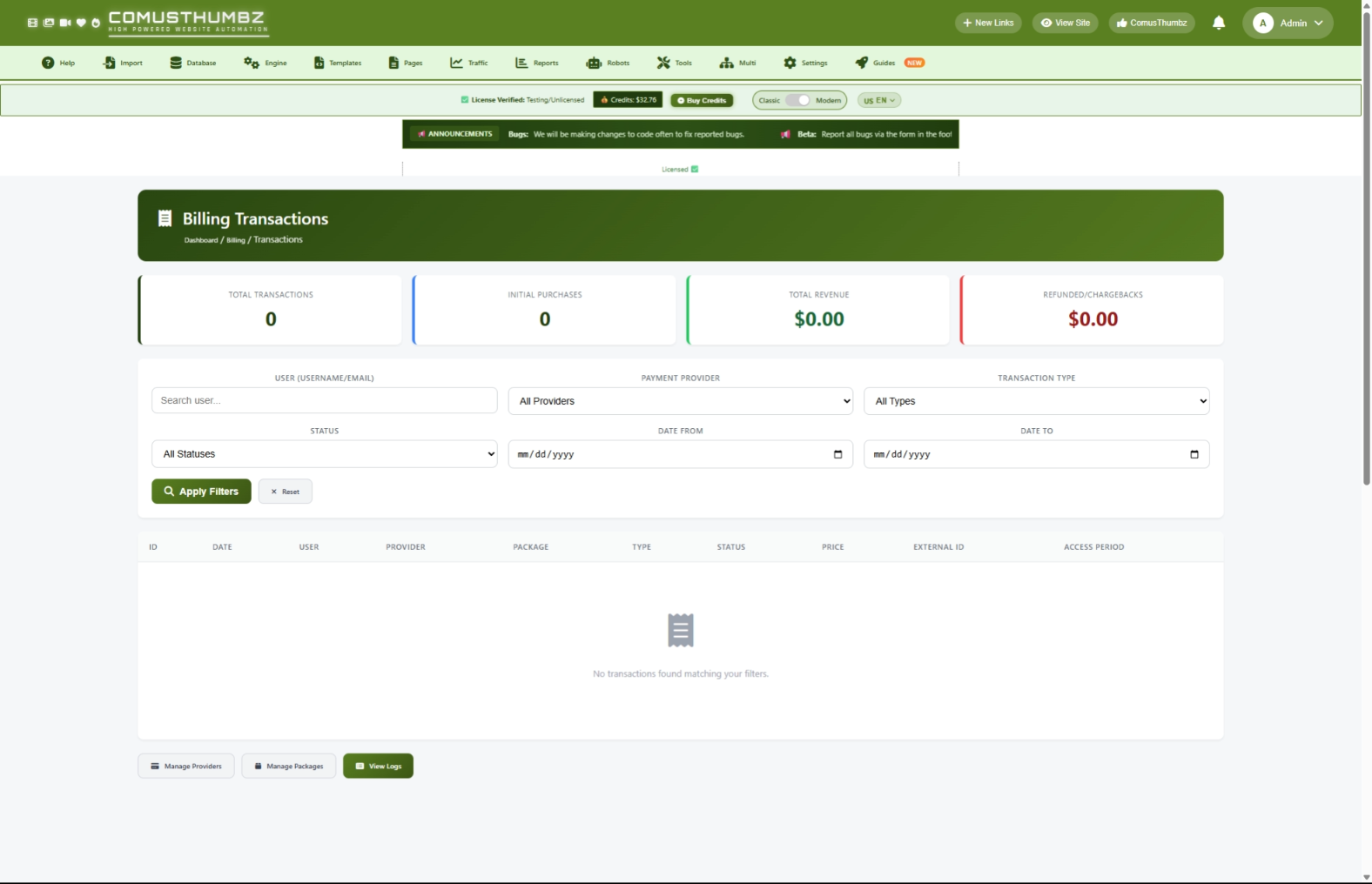
Bagaimana mendapatkan sini
Navigasi ke Panel Admin > Pengaturan > Sistem penagihan > Tampilan Transaksi
Memahami Halaman
Ketika Anda membuka halaman ini, Anda akan melihat ringkasan keuangan Anda di bagian atas, satu set filter untuk mempersempit apa yang Anda lihat, dan tabel daftar setiap transaksi.
Kartu Statistik
Di bagian atas halaman, empat kartu memberikan snapshot aktivitas penagihan Anda:
Panel Penyaring
Di bawah kartu statistik, Anda akan melihat deretan opsi filter. Ini memungkinkan Anda untuk mencari transaksi tertentu bukannya menggulung seluruh daftar. Rincian lebih lanjut pada menggunakan filter berada di Tugas Umum bagian bawah.
Tabel Transaksi
Area utama halaman ini adalah meja daftar transaksimu dari terbaru sampai tertua. Tiap baris menunjukkan tanggal, pengguna yang membuat pembayaran, penyedia pembayaran, paket yang mereka beli, tipe transaksi, status, dan jumlah yang dibayar.
Transaksi berwarna - kode sehingga Anda dapat melihat informasi penting sekilas:
- Jumlah hijau Mewakili uang masuk (pembelian, biaya berulang, penjualan token)
- Jumlah merah Mewakili uang keluar (chargebacks, refunt, voided trances)
Setiap transaksi juga memiliki label berwarna menunjukkan tipenya:
Status label memberitahu Anda di mana transaksi berdiri:
Tombol Navigasi
Di bagian bawah halaman, tiga tombol memungkinkan Anda dengan cepat melompat ke halaman yang terkait:
- Kelola Penyedia -- Pergi ke pengaturan penyedia pembayaran Anda
- Kelola Paket --Pergi ke pengaturan paket berlangganan dan token
- Tilik Log --Pergi ke log tagihan mentah untuk penyusunan rinci
Tugas Umum
Cara Melihat Semua Transaksi
- Ke Panel Admin > Billing > Transaksi.
- Halaman penuh dengan semua transaksi terdaftar dari terbaru ke tertua.
- Periksa empat kartu statistik di atas untuk ringkasan keuangan cepat.
- Scroll melalui tabel untuk meninjau transaksi individu.
Cara Mencari Transaksi Pengguna Khusus
- Ketik nama pengguna atau alamat email ke dalam Pengguna lapangan. Anda tidak perlu mengetik nama lengkap -- kerja parsial cocok.
- Klik Terapkan Filter.
- Meja sekarang menunjukkan hanya transaksi dari pengguna itu.
Cara Filter oleh Penyedia Pembayaran
- Klik Penyedia dropdown.
- Pilih penyedia pembayaran yang ingin Anda tinjau.
- Klik Terapkan Filter.
- Hanya transaksi yang diproses melalui penyedia yang ditampilkan.
Cara Filter menurut Tipe Transaksi
- Klik Tipe dropdown.
- Pilih tipe yang anda tertarik (misalnya, Chargeback atau Rebill).
- Klik Terapkan Filter.
Cara Filter menurut Status
- Klik Status dropdown.
- Pilih Buka, Tutup, atau Dibatalkan.
- Klik Terapkan Filter.
Cara Filter menurut Jangkauan Tanggal
- Klik Tanggal Dari lapangan dan memilih tanggal awal.
- Klik Tanggal Ke lapangan dan memilih tanggal akhir.
- Klik Terapkan Filter.
- Tabel hanya menunjukkan transaksi yang terjadi antara dua tanggal (kedua tanggal termasuk).
Cara Menggabungkan Beberapa Filter
Anda dapat menggunakan kombinasi dari filter di atas pada saat yang sama. Sebagai contoh, Anda dapat mencari pengguna tertentu, pilih penyedia spesifik, dan atur jangkauan tanggal sekaligus.
- Isi sebanyak yang Anda butuhkan.
- Klik Terapkan Filter.
- Hasil dan statistik kartu update untuk menunjukkan hanya transaksi yang cocok dengan semua kriteria yang Anda pilih.
Cara menghapus Semua Filter
- Klik Reset tombol di samping Terapkan Filter Tombol.
- Halaman ini memuat ulang semua transaksi tanpa filter yang diterapkan.
Bagaimana Lacak Berlangganan Waktu
- Cari pembeli awal pembelian di meja.
- Catatan nama pengguna mereka di Pengguna kolom.
- Ketik nama pengguna ke dalam Pengguna ruas filter dan klik Terapkan Filter.
- Anda sekarang dapat melihat riwayat penuh mereka: pembelian asli mereka, biaya yang berulang (tagihan ulang), dan setiap pengembalian dana atau chargebacks.
- Periksa Periode Akses kolom untuk dilihat ketika langganan mereka dimulai dan ketika diatur untuk kadaluarsa.
Bagaimana Menyelidiki Chargebacks
- Pilih Chargeback dari Tipe dropdown.
- Klik Terapkan Filter.
- Tinjau setiap transaksi chargeback di meja.
- Catatan pengguna dan ID eksternal untuk masing-masing.
- Untuk melihat apakah pengguna memiliki pola chargeback, ketik nama pengguna mereka ke dalam Pengguna filter dan klik Terapkan Filter lagi untuk melihat sejarah transaksi mereka.
Cara Navigasi Antara Halaman Hasil
Jika Anda memiliki banyak transaksi, mereka membagi beberapa halaman (50 per halaman). Gunakan nomor halaman atau panah Sebelumnya / Berikutnya di bagian bawah tabel untuk bergerak di antara halaman. Filter Anda tetap di tempat saat Anda menavigasi.
Tips untuk Pengguna Baru
- Periksa transaksimu setidaknya sekali sehari untuk menangkap masalah lebih awal.
- Gunakan filter jangkauan tanggal untuk membandingkan pendapatan seminggu lebih atau sebulan lebih.
- Perhatikan baik-baik Refunded / Chargebacks kartu. Jika angka itu mulai meningkat, segera selidiki.
- Jika pelanggan menghubungi Anda tentang masalah pembayaran, cari nama atau email mereka di halaman ini untuk dengan cepat menarik sejarah mereka.
- Gunakan Tilik Log tombol di bagian bawah halaman jika Anda membutuhkan lebih detail teknis tentang transaksi tertentu.
Terbaik Praktek
Pemantauan Harian
- Buka halaman Bill Transaksi.
- Set Tanggal Dari filter ke tanggal kemarin dan Tanggal Ke filter ke tanggal hari ini.
- Klik Terapkan Filter.
- Tinjau kartu statistik untuk mengkonfirmasi bahwa transaksi diproses secara normal.
- Periksa pembayaran atau pengembalian uang.
Ulasan Mingguan
- Mengatur rentang tanggal ke tujuh hari terakhir.
- Catatan Pendapatan Total dan Refunded / Chargebacks jumlah.
- Bandingkan angka-angka ini ke minggu sebelumnya untuk melihat tren.
- Filter dengan tiap penyedia pembayaran secara terpisah untuk melihat mana yang terbaik.
Rekonsiliasi bulanan
- Mengatur rentang tanggal untuk menutupi bulan penuh.
- Bandingkan Pendapatan Total nomor pada halaman ini dengan laporan dari dashboard penyedia pembayaran Anda sendiri.
- Jika angka tidak cocok, gunakan Tilik Log tombol untuk menyelidiki setiap transaksi yang hilang atau duplikat.
Panduan Tingkat Chargeback
Penelusuran masalah
Transaksi tidak muncul
Apa yang kau lihat: Seorang pelanggan mengatakan mereka membayar, tetapi Anda tidak dapat menemukan transaksi mereka pada halaman ini.
Bagaimana memperbaikinya:
- Pastikan tidak ada filter yang aktif. Klik Reset untuk membersihkan semua filter.
- Cari pelanggan berdasarkan nama atau email di Pengguna lapangan.
- Jika transaksi masih tidak muncul, klik Tilik Log di bagian bawah halaman untuk memeriksa apakah pemberitahuan pembayaran diterima.
- Log ke dasbor penyedia pembayaran Anda dan konfirmasi transaksi ada di sana.
- Jika ada transaksi di penyedia tapi tidak di situs Anda, hubungi pengembang Anda atau tim dukungan untuk bantuan.
Transaksi menunjukkan "N / A" bagi pengguna
Apa yang kau lihat: The Pengguna kolom menampilkan nomor ID pemakai bukan nama pengguna, atau menampilkan "N / A".
Bagaimana memperbaikinya:
Ini biasanya berarti akun pengguna dihapus setelah pembelian, atau pembelian tidak terhubung ke akun pengguna. Data transaksi masih utuh. Jika Anda tahu pengguna mana pemilik ini, hubungi pengembang atau tim dukungan Anda untuk menghubungkannya secara manual.
Transaksi menunjukkan "N / A" bagi penyedia
Apa yang kau lihat: The Penyedia kolom menunjukkan "N / A" bukan nama penyedia.
Bagaimana memperbaikinya:
Hal ini dapat terjadi jika penyedia pembayaran dihapus dari pengaturan Anda setelah transaksi sudah direkam. Data transaksi aman. Jika Anda ingin mengembalikan nama penyedia, hubungi pengembang atau tim dukungan Anda.
Rebills tidak muncul
Apa yang kau lihat: Seorang pelanggan harus mendapatkan biaya bulanan, tetapi Anda tidak melihat transaksi tagihan ulang baru.
Bagaimana memperbaikinya:
- Periksa dasbor penyedia pembayaran Anda untuk melihat apakah langganan masih aktif di akhir mereka.
- Klik Tilik Log untuk mencari pemberitahuan pembayaran yang gagal.
- Jika langganan aktif di penyedia tapi tagihan tidak muncul di situs Anda, mungkin ada masalah koneksi antara penyedia dan situs Anda. Hubungi pengembang Anda atau tim dukungan.
Nomor pembayaran tidak cocok dengan penyedia pembayaran Anda
Apa yang kau lihat: The Pendapatan Total ditampilkan di halaman ini tidak cocok dengan laporan penyedia pembayaran anda.
Bagaimana memperbaikinya:
- Pastikan Anda membandingkan rentang tanggal yang sama. Set Tanggal Dari dan Tanggal Ke Filter untuk mencocokkan jangkauan yang Anda periksa pada dasbor penyedia Anda.
- Ingat bahwa Pendapatan Total kartu pada halaman ini termasuk baik pembelian awal dan biaya berulang, tetapi tidak mengurangi pengembalian dana atau chargebacks. The Refunded / Chargebacks kartu menunjukkan mereka secara terpisah.
- Jika masih ada perbedaan setelah akuntansi untuk itu, klik Tilik Log untuk memeriksa pemberitahuan pembayaran yang hilang.